Operate documentation publishing
Purpose
Diagnose Forgejo Actions builds, stale production content, the CT 101 static
backend, and the CT 103 ingress route without changing unrelated services.
Prerequisites and risk
- Read access to the Forgejo Actions job.
ssh pvessh.- Repository access.
Status and HTTP checks are read-only. Restarting a unit, rerunning a workflow, or replacing artifacts changes production and requires authorization.
Diagnose a failed Forgejo Actions build
1. Open the latest docs-build run and identify the failed step.

Forgejo Actions run-list example. Select the run for the exact commit being diagnosed; names and labels in this upstream example are not KH3 values.
2. Compare the workflow with the canonical path.
sed -n '1,240p' .forgejo/workflows/docs.yml
3. Confirm runner health and label.
ssh pvessh 'pct exec 101 -- runuser -l podsvc -c \
  "XDG_RUNTIME_DIR=/run/user/2000 systemctl --user status runner.service --no-pager"'
ssh pvessh 'pct exec 101 -- runuser -l podsvc -c \
  "podman logs --tail=200 runner"'
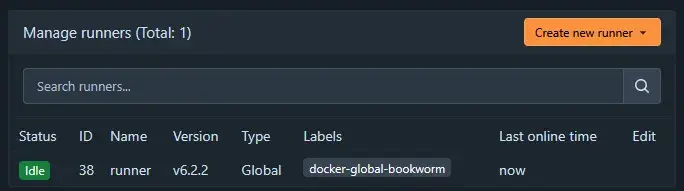
The runner settings page shows online state and labels. KH3 requires an online
runner with label mkdocs; the screenshot's docker label is only an upstream
example.
4. Confirm the runner config contains the mkdocs label and allows:
/opt/podman/volumes/forgejo/runner-data
Do not print /data/.runner or tokens.
5. Interpret common failures.
| Failure | Meaning | Remedy |
|---|---|---|
| Checkout/authentication | Token, internal DNS, or Forgejo reachability | Check job token and git.kh3group.com mapping without printing credentials |
pip/DNS failure |
Job container cannot resolve external names | Verify runner DNS options and Technitium recursion |
| Strict MkDocs failure | Source, link, anchor, plugin, or nav defect | Reproduce locally and fix source |
not a valid volume |
Runner ignored publish bind | Correct container.valid_volumes and ensure daemon loaded --config /config.yml |
/runner-data mount check fails |
Job is ephemeral | Correct runner/workflow volume; do not publish elsewhere |
| Permission denied copying site | Ownership/mode drift | Inspect publish directory ownership; restore podsvc write and world-read/execute only as required |
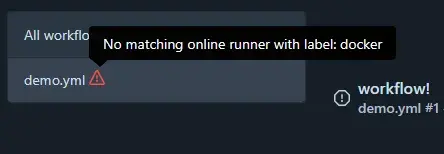
The no-matching-runner warning indicates a label or online-state mismatch.
Compare runs-on with the live runner labels before changing the workflow.
Diagnose stale published documentation
1. Compare source, job, and artifact times.
git log -1 --format='%H %cI'
ssh pvessh 'pct exec 101 -- stat -c "%y %n" \
  /opt/podman/volumes/forgejo/runner-data/publish/kh3-it-infra-docs/site/index.html'
curl -sSI https://docs.kh3group.com/ | sed -n '/^last-modified:/Ip'
2. Confirm whether a successful main push occurred after the artifact
time. Pull requests build but do not publish. Local commits and an unpushed
branch cannot update production.
3. Check the newest Actions run for the exact commit. Confirm the Publish
site step ran rather than being skipped.
4. Confirm the workflow wrote the shared mount, not an ephemeral directory.
5. Do not restart Caddy when the artifact itself is old and both serving
layers return 200.
Expected on a successful publication: index.html time advances, the static
backend returns 200, and the public Last-Modified reflects the new artifact.
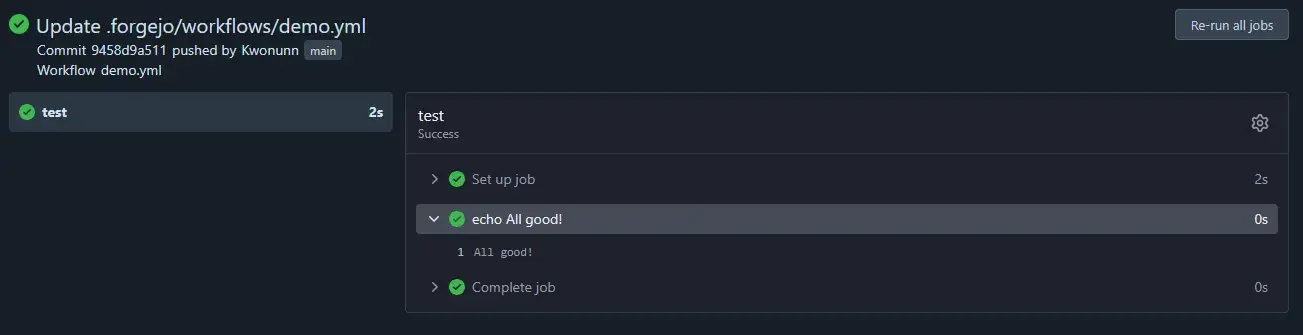
A successful Forgejo job shows each completed step. For KH3, success is not enough by itself: also confirm that the publish step advanced the shared artifact timestamp.
Check CT 101 docs-static
ssh pvessh 'pct exec 101 -- runuser -l podsvc -c \
  "XDG_RUNTIME_DIR=/run/user/2000 systemctl --user status docs-static.service --no-pager"'
ssh pvessh 'pct exec 101 -- sed -n "1,160p" \
  /home/podsvc/.config/containers/systemd/docs-static.container'
ssh pvessh 'pct exec 101 -- curl -sS -o /dev/null -w "%{http_code}\n" \
  http://127.0.0.1:30084/'
Expected: active unit, read-only /srv mount, and HTTP 200.
Check CT 103 ingress
ssh pvessh 'pct exec 103 -- systemctl is-active caddy'
ssh pvessh 'pct exec 103 -- grep -nE \
  "docs\.kh3group\.com|192\.168\.2\.20:30084" /opt/caddy/config/Caddyfile'
ssh pvessh 'pct exec 103 -- curl -sS -o /dev/null -w "%{http_code}\n" \
  http://192.168.2.20:30084/'
Expected: active Caddy, matching route, backend 200.
Recovery and rollback
- Failed source change: revert the source commit through normal Git review and let CI publish the corrected build.
- Bad artifact with good previous source: rebuild the known-good commit in CI.
- Static unit failure: restore the reviewed Quadlet, reload the
podsvcuser manager, and restart onlydocs-static.serviceduring an approved action. - Ingress route failure: restore the prior Caddyfile backup, validate with the secret environment loaded without printing it, and restart Caddy only with authorization.
Never switch to .drone.yml or copy files into CT 103 as an incident
shortcut; that creates a second source of truth.